Free prescription OCR
Upload a prescription and extract the prescriber, patient, medicines, doses and dates as structured data, free. It reads printed prescriptions and clear handwriting from a scan or photo, with no account needed. It's for administrative work only: never use it to dispense or take a medicine.
- Free
- No sign-up, no card
- Download as Excel, CSV or JSON
Prescriptions hold health information. Upload only what you're allowed to share. Not for dispensing or clinical use. We keep the first page and the result for 7 days to run and improve this tool, then delete them. The rest of your file is not stored. Privacy policy
{
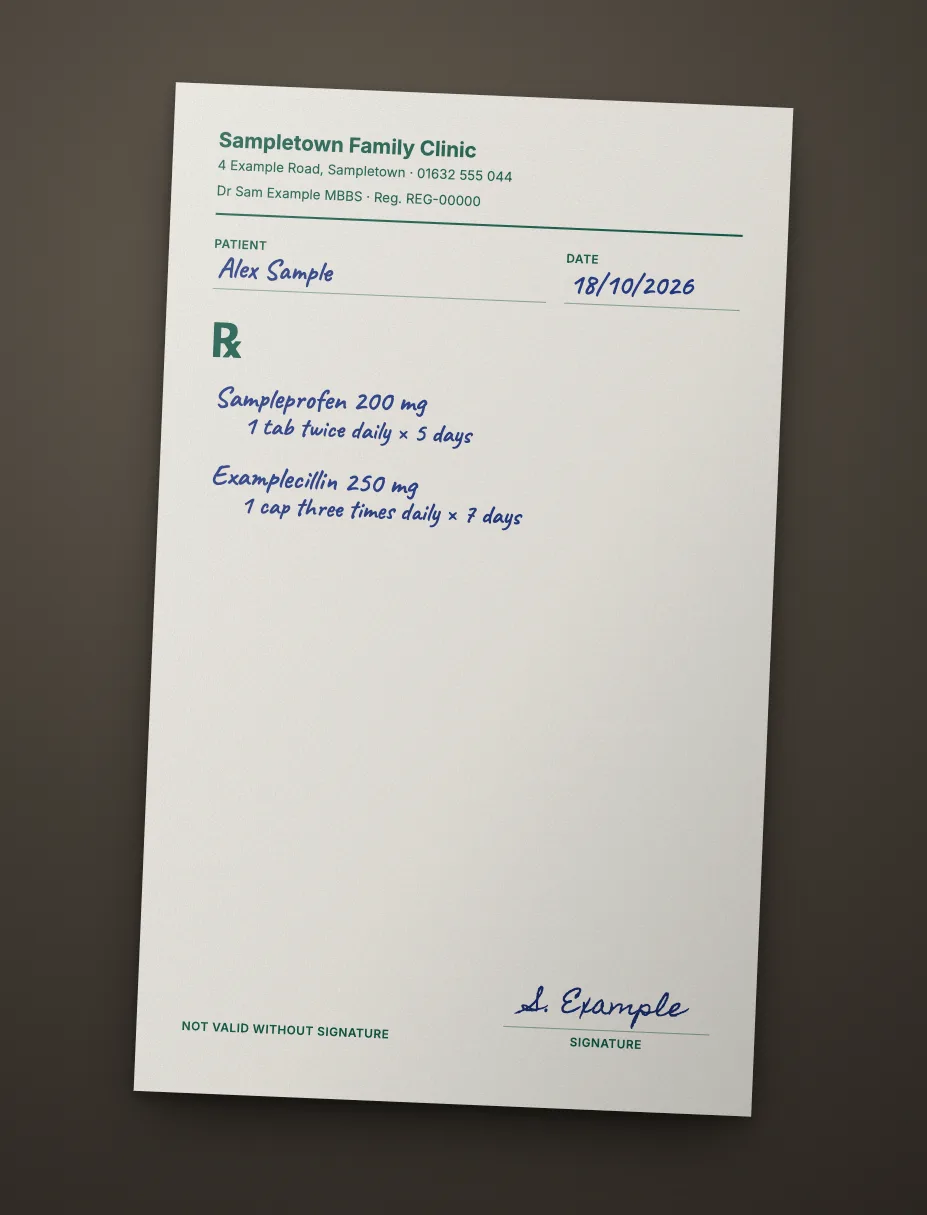
  "prescriber_name": "Dr Sam Example",  "registration_number": "REG-00000",  "patient_name": "Alex Sample",  "prescription_date": "2026-10-18"}
Any layout, no template
It works out the fields from the page itself, so there's nothing to set up.
Scans and phone photos
Digital PDFs, scanned pages and photos all go through the same way.
Structured, not just text
Named fields and table rows you can download as Excel, CSV or JSON, not a wall of OCR text.
An API when you need it
The same data from your own code, as the sample call further down shows.
What the free prescription reader extracts
- Prescriber: doctor's name, qualifications, clinic, registration number and contact details.
- Patient: name, age, sex and date of the prescription.
- Medicines: drug name, strength, form, dose, frequency, duration and quantity.
- Notes: instructions, refills and follow-up dates where they're written.
Types of prescription you can upload
- Printed prescriptions and those from clinic software.
- Handwritten prescriptions and doctor's notes, with varying results.
- E-prescriptions, shared as a PDF or a screenshot.
- Eyeglass and contact lens prescriptions.
- Repeat prescriptions and pharmacy refill slips.
Prescription names by region
| Region | Names | Prescriber details |
|---|---|---|
| Pakistan | Prescription, parchi, doctor's slip | PMDC registration number |
| India | Prescription, Rx, OPD slip | State medical council or NMC number |
| UAE, Saudi Arabia | Prescription, e-prescription (Wasfaty) | Licence number |
| United Kingdom | NHS prescription, FP10, private prescription | GMC number |
| United States, Canada | Rx, e-prescription, refill slip | NPI, DEA number where required |
| Europe | Rezept, ordonnance, receta | National prescriber number |
What happens with handwriting
Clear handwriting often reads well, but a hurried script is hard for people and software alike. The tool returns its best reading of what's on the page, and it can get it wrong. Treat handwritten values as a draft to check against the original, every time.
Prescriptions aren't a built-in document type yet, so an account reads them through a workflow built from one sample, and values under your confidence threshold go to a person for review. See healthcare administration.
Sample API call
This is how the same prescription looks from your own code. wf_demo_prescription is a dummy workflow id and every value below is invented, so the call won't run as written. A real run reads every page and adds a confidence score and page position to each field.
curl -X POST "$DOCREFINERY_API/v1/workflows/wf_demo_prescription/run" \
  -H "Authorization: Bearer $DOCREFINERY_API_KEY" \
  -F "[email protected]"

# Take trace_id from the answer, then poll until status is "fulfilled"
curl "$DOCREFINERY_API/v1/runway/9f1c0a7e" \
-H "Authorization: Bearer $DOCREFINERY_API_KEY"{
"trace_id": "9f1c0a7e",
"status": "fulfilled",
"document_type": "prescription",
"result": {
"fields": [
{
"key": "prescriber_name",
"alias": "Prescriber Name",
"text": "Dr Sam Example",
"field_confidence": 0.99,
"location": { "page": 1, "bbox": [0.08, 0.12, 0.46, 0.14] }
},
{
"key": "registration_number",
"alias": "Registration Number",
"text": "REG-00000",
"field_confidence": 0.98,
"location": { "page": 1, "bbox": [0.08, 0.17, 0.46, 0.19] }
},
{
"key": "patient_name",
"alias": "Patient Name",
"text": "Alex Sample",
"field_confidence": 0.97,
"location": { "page": 1, "bbox": [0.08, 0.22, 0.46, 0.24] }
},
{
"key": "medicines",
"alias": "Medicines",
"table": [
[
{ "key": "medicine", "alias": "Medicine", "text": "Sampleprofen 200 mg" },
{ "key": "dose", "alias": "Dose", "text": "1 tablet" },
{ "key": "frequency", "alias": "Frequency", "text": "Twice daily" },
{ "key": "days", "alias": "Days", "text": "5" }
]
]
}
],
"extraction_approval": "auto",
"low_confidence_fields": []
}
}Make it run on your own prescription
- Create a free account.
- Upload one sample under Workflows, keep the fields you want and save. That gives you a real workflow id.
- Create an API key under Settings. Keys are switched on per account, so ask us if you don't see the option.
- Set
DOCREFINERY_APIandDOCREFINERY_API_KEYas in the quickstart, and swap in your id.
Free try or free account?
| Feature | Free try | Free account |
|---|---|---|
| Pages read | Page 1 | Every page |
| Allowance | 5 tries a day | 100 pages a month |
| File size | Up to 10 MB | Up to 100 MB |
| How it reads | Finds the fields on the page | A workflow built from one sample |
| Checking | Compare with your page | Confidence scores and page citations |
| Output | Fields on screen, download as Excel, CSV or JSON | Excel, CSV and JSON for every page, and API keys on request |
Common questions
Can it read a doctor's handwriting?
Sometimes. Clear handwriting often reads well, but a rushed script can be misread. Always check every value against the original prescription, and never rely on the result to dispense or take a medicine.
Is this prescription reader free?
Yes. You get 5 free tries a day with no account or card. Each try returns the prescriber, patient and medicines from the first page as structured data.
Can pharmacies use this to dispense?
No. This tool is for administrative work such as records and claims. A qualified person must check the original before anything is dispensed.
Is my prescription stored?
We keep the first page and the result for 7 days to run and improve the tool, then delete them. Upload only prescriptions you're allowed to share, and consider covering the patient's name when testing.
Related
- Medical bill OCRFree medical bill OCR. Extract the patient, provider, charges and totals from a hospital bill or itemised statement as structured data, with no signup.
- Insurance claim OCRFree insurance claim form OCR. Extract the policy, claimant, dates and amounts from a claim form as structured data, with no account or card needed.
- Healthcare administrationHealthcare document extraction for claim forms, EOBs, referrals and intake forms: structured data for billing teams. Administrative use only, not clinical.
- Receipt OCRFree receipt OCR. Extract the merchant, date, tax, total and items from a photo or PDF as structured data. No app to install, no account or card needed.
Try it on your own prescription.
Free, with no sign-up and no card.