Free receipt OCR and data extraction
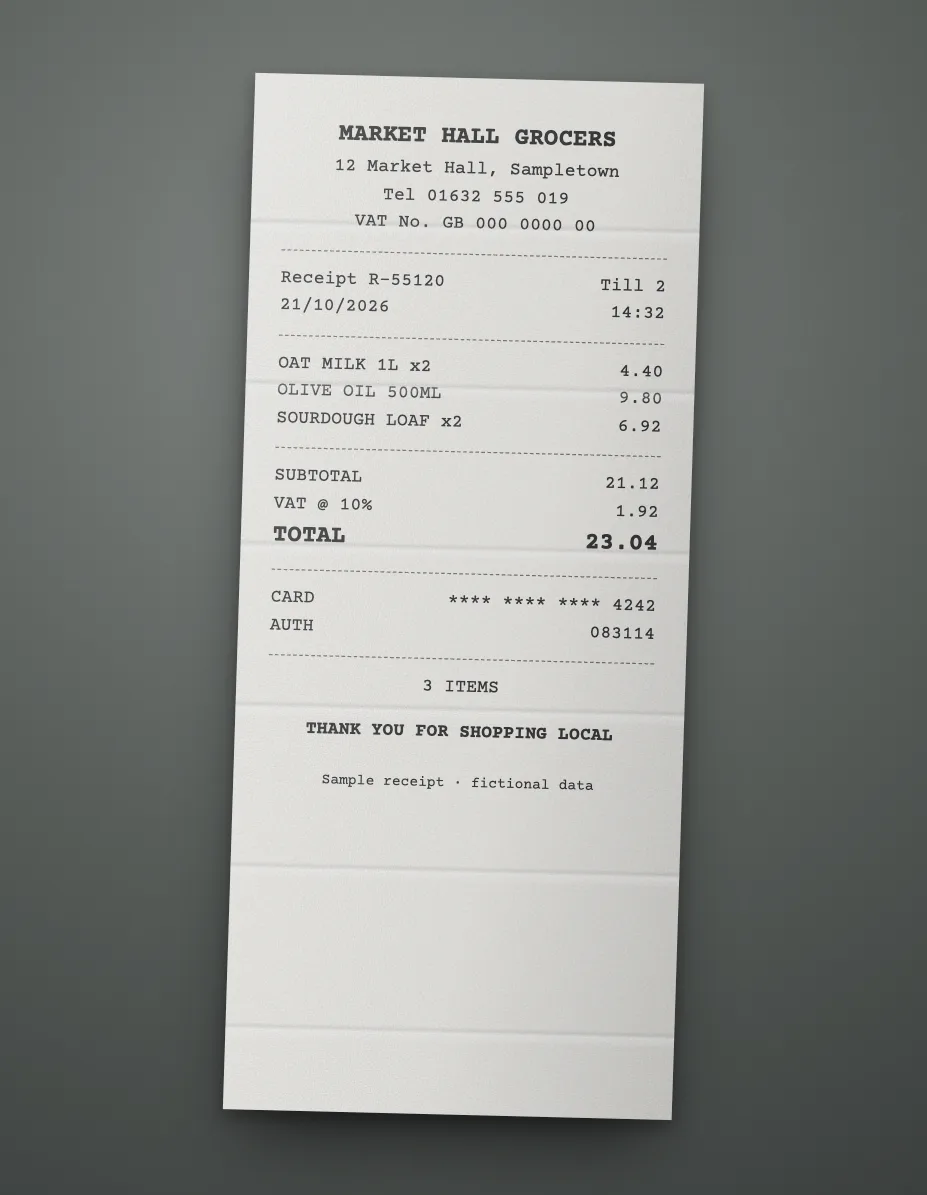
Upload a receipt and extract the merchant, date, tax, total and every item as structured data, free. It reads phone photos of paper receipts as well as PDF and emailed receipts, with no app to install and no account needed.
- Free
- No sign-up, no card
- Download as Excel, CSV or JSON
We keep the first page and the result for 7 days to run and improve this tool, then delete them. The rest of your file is not stored. Privacy policy
{
  "receipt_id": "R-55120",  "receipt_date": "2026-10-21",  "supplier_name": "Market Hall Grocers",  "total_tax": "1.92"}
Any layout, no template
It works out the fields from the page itself, so there's nothing to set up.
Scans and phone photos
Digital PDFs, scanned pages and photos all go through the same way.
Structured, not just text
Named fields and table rows you can download as Excel, CSV or JSON, not a wall of OCR text.
An API when you need it
The same data from your own code, as the sample call further down shows.
What the free receipt scanner reads
- Merchant: store name, branch, address, phone and tax number.
- Purchase: receipt number, date, time and cashier or till.
- Items: description, quantity, unit price and amount.
- Totals: subtotal, tax, tip, discount and total paid.
- Payment: cash or card, last four card digits and change given.
Types of receipt you can upload
| Receipt type | Also called | Fields people want |
|---|---|---|
| Shop and supermarket | Till receipt, cash memo, sales receipt | Items, tax, total |
| Restaurant | Bill, check, food receipt | Tip, service charge, total |
| Fuel | Petrol or gas receipt | Litres or gallons, price, pump |
| Taxi and ride | Trip receipt, fare receipt | Route, date, fare |
| Hotel | Folio, hotel bill | Nights, room charges, tax |
| Payment proof | Bank transfer receipt, POS slip | Reference, amount, date |
| Rent and fees | Rent receipt, donation receipt | Payer, period, amount |
Receipts by region
| Region | Names | Tax details printed |
|---|---|---|
| Pakistan | Cash memo, sales receipt, FBR POS invoice | NTN, STRN, FBR invoice number |
| India | Cash memo, bill of supply, tax invoice | GSTIN, CGST, SGST |
| UAE, Gulf | Tax invoice, simplified tax invoice | TRN, VAT |
| United Kingdom, EU | Till receipt, Kassenbon, ticket de caisse | VAT number, VAT rate |
| United States, Canada | Sales receipt | Sales tax, GST or HST |
| Latin America | Recibo, ticket, boleta | RFC, RUT, IVA |
Tips for a faded or crumpled receipt
Thermal paper fades, so photograph receipts early. Flatten the receipt on a dark surface, get the whole strip in frame and avoid shadows from your phone. For a long receipt, photograph it in one image if the text stays sharp, or split it across pages of a PDF and use a free account to read them all.
For expenses at volume, the receipt field list covers all 35 fields, and an account exports to CSV and XLSX for your bookkeeping.
Sample API call
This is how the same receipt looks from your own code. wf_demo_receipt is a dummy workflow id and every value below is invented, so the call won't run as written. A real run reads every page and adds a confidence score and page position to each field.
curl -X POST "$DOCREFINERY_API/v1/workflows/wf_demo_receipt/run" \
  -H "Authorization: Bearer $DOCREFINERY_API_KEY" \
  -F "[email protected]"

# Take trace_id from the answer, then poll until status is "fulfilled"
curl "$DOCREFINERY_API/v1/runway/9f1c0a7e" \
-H "Authorization: Bearer $DOCREFINERY_API_KEY"{
"trace_id": "9f1c0a7e",
"status": "fulfilled",
"document_type": "receipt",
"result": {
"fields": [
{
"key": "receipt_id",
"alias": "Receipt ID",
"text": "R-55120",
"field_confidence": 0.99,
"location": { "page": 1, "bbox": [0.08, 0.12, 0.46, 0.14] }
},
{
"key": "receipt_date",
"alias": "Receipt Date",
"text": "2026-10-21",
"field_confidence": 0.98,
"location": { "page": 1, "bbox": [0.08, 0.17, 0.46, 0.19] }
},
{
"key": "supplier_name",
"alias": "Supplier Name",
"text": "Market Hall Grocers",
"field_confidence": 0.97,
"location": { "page": 1, "bbox": [0.08, 0.22, 0.46, 0.24] }
},
{
"key": "items",
"alias": "Items",
"table": [
[
{ "key": "item", "alias": "Item", "text": "Oat milk 1L" },
{ "key": "qty", "alias": "Qty", "text": "2" },
{ "key": "amount", "alias": "Amount", "text": "4.40" }
]
]
}
],
"extraction_approval": "auto",
"low_confidence_fields": []
}
}Make it run on your own receipt
- Create a free account.
- Upload one sample under Workflows, keep the fields you want and save. That gives you a real workflow id.
- Create an API key under Settings. Keys are switched on per account, so ask us if you don't see the option.
- Set
DOCREFINERY_APIandDOCREFINERY_API_KEYas in the quickstart, and swap in your id.
Free try or free account?
| Feature | Free try | Free account |
|---|---|---|
| Pages read | Page 1 | Every page |
| Allowance | 5 tries a day | 100 pages a month |
| File size | Up to 10 MB | Up to 100 MB |
| How it reads | Finds the fields on the page | Built-in receipt fields, or your own workflow |
| Checking | Compare with your page | Confidence scores and page citations |
| Output | Fields on screen, download as Excel, CSV or JSON | Excel, CSV and JSON for every page, and API keys on request |
Common questions
Is this receipt scanner free?
Yes. You get 5 free tries a day with no account, no card and nothing to install. Each try returns the receipt's fields and items as structured data.
Can I scan a receipt from my phone?
Yes. Open this page on your phone, take a photo of the receipt and upload it. Good light and a flat receipt give the cleanest read.
Can it read the items on a receipt, not just the total?
Yes. Items come back as rows with their description, quantity and amount when the receipt prints them. Check abbreviated item names, which shops often shorten.
Can I export receipts to Excel for expenses?
Yes. Use Download after a free try to save the receipt as Excel (.xlsx), CSV or JSON. A free account reads up to 100 pages a month, keeps your results in one place and exports many receipts together.
Related
- ReceiptRead merchant, date, tax, tip and items from receipt photos and PDFs. Faded or creased values go to a reviewer instead of straight into your books.
- Invoice OCRFree invoice OCR and data extraction. Pull supplier, tax, totals and line items from a PDF or scan as structured JSON, with no account or card needed.
- Bank statement OCRFree bank statement OCR. Extract account details, balances and transactions from a PDF or scan as structured data, with no account or card needed.
- Utility bill OCRFree utility bill OCR for electricity, gas, water and phone bills. Extract the account, address, usage and amount due as structured data, with no signup.
Try it on your own receipt.
Free, with no sign-up and no card.