Free invoice OCR and data extraction
Upload an invoice and extract the supplier, dates, tax, totals and line items as structured data, free. It reads PDF invoices, scans and photos, from any vendor and in any layout, with no template to set up and no account needed.
- Free
- No sign-up, no card
- Download as Excel, CSV or JSON
We keep the first page and the result for 7 days to run and improve this tool, then delete them. The rest of your file is not stored. Privacy policy
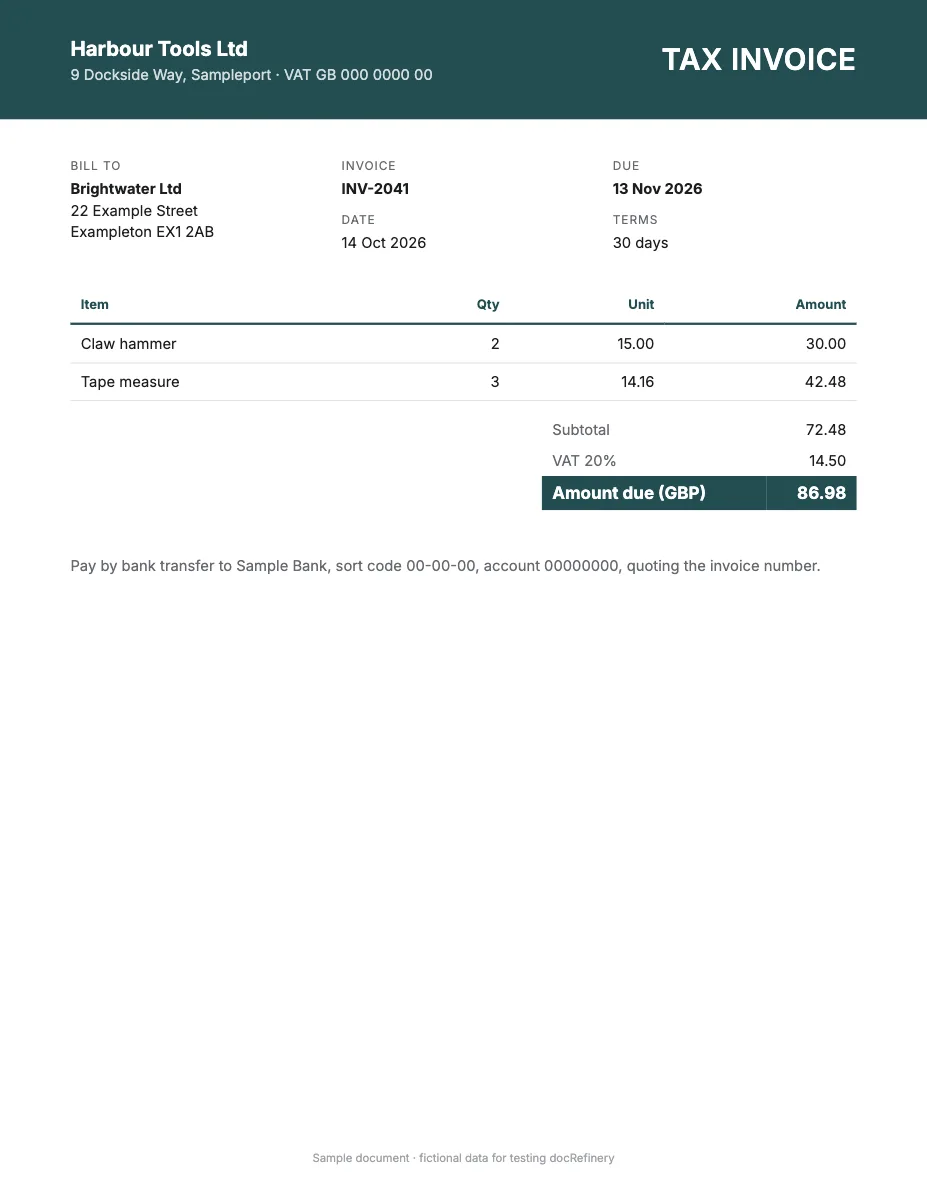
{
  "invoice_id": "INV-2041",  "invoice_date": "2026-10-14",  "due_date": "2026-11-13",  "customer_name": "Brightwater Ltd"}
Any layout, no template
It works out the fields from the page itself, so there's nothing to set up.
Scans and phone photos
Digital PDFs, scanned pages and photos all go through the same way.
Structured, not just text
Named fields and table rows you can download as Excel, CSV or JSON, not a wall of OCR text.
An API when you need it
The same data from your own code, as the sample call further down shows.
What the free invoice extractor reads
Plain OCR gives you the text of an invoice. Invoice extraction gives you what the text means: which number is the invoice number, which date is the due date, and which rows are line items. The result comes back as named fields and a line item table.
- Header: invoice number, invoice date, due date and purchase order number.
- Parties: supplier and customer names, addresses and tax numbers.
- Line items: description, quantity, unit price and amount.
- Totals: subtotal, tax, discount, shipping and amount due.
- Payment: bank details, payment terms and currency.
Invoice names and tax IDs by region
Tax rules shape what an invoice prints. These are the regional invoice types people look for, and the tax details each one carries.
| Region | Invoice type | Tax details printed |
|---|---|---|
| Pakistan | Sales tax invoice | NTN, STRN, sales tax amount |
| India | GST invoice, tax invoice, e-invoice | GSTIN, HSN or SAC code, CGST, SGST, IGST, IRN |
| UAE, Gulf | Tax invoice, VAT invoice | TRN, VAT amount |
| Saudi Arabia | ZATCA e-invoice, tax invoice | VAT number, QR code |
| United Kingdom, Ireland | VAT invoice | VAT registration number, VAT rate |
| European Union | Rechnung, facture, factura, fattura | VAT ID, reverse charge notes |
| United States, Canada | Invoice, bill, vendor invoice | Sales tax, GST or HST, EIN where printed |
| Australia, New Zealand | Tax invoice | ABN or NZBN, GST |
| Mexico, Brazil | CFDI factura, Nota Fiscal (NF-e) | RFC, CNPJ, tax totals |
Types of invoice you can upload
- Supplier invoices, vendor bills and service invoices.
- Proforma invoices, credit notes and debit notes.
- Commercial invoices for shipments, and freight invoices.
- Recurring invoices such as subscriptions and rent.
- Scans, photos and PDFs, including invoices with several tax rates.
From one invoice to accounts payable
One free try shows you what comes out. At volume, the same vendor's layout comes back month after month, and that's where an account pays off: docRefinery remembers each vendor layout, flags low-confidence values for a person, and sends clean data on through the API or a CSV export. The invoice field list covers all 62 fields, and accounts payable covers the workflow.
Sample API call
This is how the same invoice looks from your own code. wf_demo_invoice is a dummy workflow id and every value below is invented, so the call won't run as written. A real run reads every page and adds a confidence score and page position to each field.
curl -X POST "$DOCREFINERY_API/v1/workflows/wf_demo_invoice/run" \
  -H "Authorization: Bearer $DOCREFINERY_API_KEY" \
  -F "[email protected]"

# Take trace_id from the answer, then poll until status is "fulfilled"
curl "$DOCREFINERY_API/v1/runway/9f1c0a7e" \
-H "Authorization: Bearer $DOCREFINERY_API_KEY"{
"trace_id": "9f1c0a7e",
"status": "fulfilled",
"document_type": "invoice",
"result": {
"fields": [
{
"key": "invoice_id",
"alias": "Invoice ID",
"text": "INV-2041",
"field_confidence": 0.99,
"location": { "page": 1, "bbox": [0.08, 0.12, 0.46, 0.14] }
},
{
"key": "invoice_date",
"alias": "Invoice Date",
"text": "2026-10-14",
"field_confidence": 0.98,
"location": { "page": 1, "bbox": [0.08, 0.17, 0.46, 0.19] }
},
{
"key": "due_date",
"alias": "Due Date",
"text": "2026-11-13",
"field_confidence": 0.97,
"location": { "page": 1, "bbox": [0.08, 0.22, 0.46, 0.24] }
},
{
"key": "line_items",
"alias": "Line Items",
"table": [
[
{ "key": "item", "alias": "Item", "text": "Claw hammer" },
{ "key": "qty", "alias": "Qty", "text": "2" },
{ "key": "unit", "alias": "Unit", "text": "15.00" },
{ "key": "amount", "alias": "Amount", "text": "30.00" }
]
]
}
],
"extraction_approval": "auto",
"low_confidence_fields": []
}
}Make it run on your own invoice
- Create a free account.
- Upload one sample under Workflows, keep the fields you want and save. That gives you a real workflow id.
- Create an API key under Settings. Keys are switched on per account, so ask us if you don't see the option.
- Set
DOCREFINERY_APIandDOCREFINERY_API_KEYas in the quickstart, and swap in your id.
Free try or free account?
| Feature | Free try | Free account |
|---|---|---|
| Pages read | Page 1 | Every page |
| Allowance | 5 tries a day | 100 pages a month |
| File size | Up to 10 MB | Up to 100 MB |
| How it reads | Finds the fields on the page | Built-in invoice fields, or your own workflow |
| Checking | Compare with your page | Confidence scores and page citations |
| Output | Fields on screen, download as Excel, CSV or JSON | Excel, CSV and JSON for every page, and API keys on request |
Common questions
Is there a free invoice OCR tool with no signup?
Yes, this one. You get 5 free tries a day with no account or card, and each one extracts the first page of an invoice as structured fields and line items.
Can it extract line items from an invoice?
Yes. Line items come back as a table of rows and columns, such as description, quantity, unit price and amount. Line items that continue past page 1 need a free account, which reads every page.
Can it read GST and VAT invoices?
Yes. Tax numbers and amounts such as GSTIN, CGST, SGST, TRN and VAT registration numbers come back as fields when the invoice prints them. Always check tax figures before you file.
Can I export invoice data to Excel or JSON?
Yes. Use Download after a free try to save the invoice as Excel (.xlsx), CSV or JSON, with line items on their own sheet. A free account reads every page, up to 100 pages a month, and adds the API. See invoice to Excel.
Related
- Invoice to ExcelConvert an invoice PDF, scan or photo to Excel or CSV free. Get supplier, totals, tax and every line item in a spreadsheet, from any vendor. No account.
- InvoiceExtract data from invoice PDFs and scans: 62 fields including line items and VAT, as JSON with confidence scores and page and box citations on values.
- Accounts payableAccounts payable document automation for invoices, POs, credit notes and statements: supplier layouts learned once, unsure fields sent to a person.
- Receipt OCRFree receipt OCR. Extract the merchant, date, tax, total and items from a photo or PDF as structured data. No app to install, no account or card needed.
- Shipping order OCRFree shipping document OCR for shipping orders, bills of lading and packing lists. Extract parties, cargo and container data as structured JSON. No signup.
Try it on your own invoice.
Free, with no sign-up and no card.