Convert an invoice to Excel, free
Upload an invoice as a PDF, scan or photo and download it as an Excel workbook or CSV: the supplier, invoice number, dates, tax and totals on one sheet, and the line items on another. It works with any vendor's layout, needs no template and no account, and is free.
- Free
- No sign-up, no card
- Download as Excel, CSV or JSON
We keep the first page and the result for 7 days to run and improve this tool, then delete them. The rest of your file is not stored. Privacy policy
{
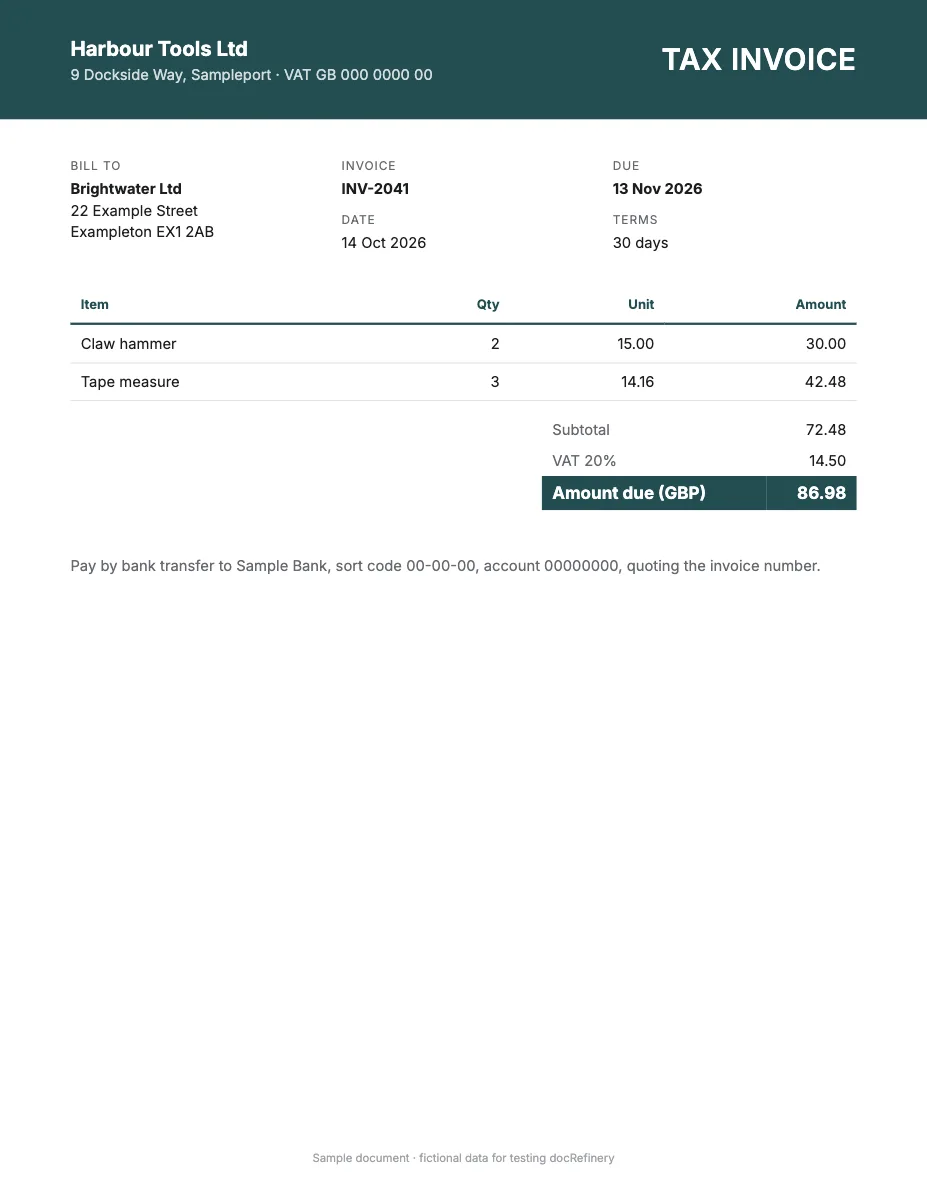
  "invoice_id": "INV-2041",  "vendor_name": "Harbour Tools Ltd",  "invoice_date": "2026-10-14",  "subtotal": "72.49"}
Any layout, no template
It works out the fields from the page itself, so there's nothing to set up.
Scans and phone photos
Digital PDFs, scanned pages and photos all go through the same way.
Structured, not just text
Named fields and table rows you can download as Excel, CSV or JSON, not a wall of OCR text.
An API when you need it
The same data from your own code, as the sample call further down shows.
Header and line items, on separate sheets
An invoice holds two kinds of data, and a useful spreadsheet keeps them apart. The Fields sheet holds one value per invoice, such as the supplier name, tax number, invoice date and amount due. The Line Items sheet has one row per product or service, with quantity, unit price and amount. Amounts arrive as numbers, so the line totals can be checked against the invoice total with one SUM.
| Sheet | Typical columns |
|---|---|
| Fields | Supplier, customer, invoice number, PO number, invoice date, due date, currency, subtotal, tax, amount due |
| Line Items | Description, quantity, unit price, tax rate, amount, as the invoice prints them |
Tax invoices from different countries
The tool reads the tax details the invoice prints. On a GST invoice from India that is the GSTIN and HSN or SAC codes; on a Pakistani sales tax invoice, the NTN and STRN; on a UAE or Saudi VAT invoice, the TRN or VAT number, often next to Arabic text; and on a European invoice, the VAT ID. Whatever the country, the columns come from the invoice itself rather than a fixed template.
Check the conversion in the spreadsheet
- Sum the Amount column on Line Items and compare it with the subtotal on the Fields sheet.
- Subtotal plus tax, less any discount, should equal the amount due.
- Quantity times unit price should equal each line's amount. A row that doesn't is the one to look at.
From one invoice to accounts payable
Converting one invoice is a quick check. Doing it for every supplier, every month, is a process: a free account reads up to 100 pages a month, remembers each vendor's layout, sends low-confidence values to a person and exports many invoices to one workbook, or sends them on through the API. See the invoice field list and accounts payable.
Sample API call
This is how the same invoice looks from your own code. wf_demo_invoice is a dummy workflow id and every value below is invented, so the call won't run as written. A real run reads every page and adds a confidence score and page position to each field.
curl -X POST "$DOCREFINERY_API/v1/workflows/wf_demo_invoice/run" \
  -H "Authorization: Bearer $DOCREFINERY_API_KEY" \
  -F "[email protected]"

# Take trace_id from the answer, then poll until status is "fulfilled"
curl "$DOCREFINERY_API/v1/runway/9f1c0a7e" \
-H "Authorization: Bearer $DOCREFINERY_API_KEY"{
"trace_id": "9f1c0a7e",
"status": "fulfilled",
"document_type": "invoice",
"result": {
"fields": [
{
"key": "invoice_id",
"alias": "Invoice ID",
"text": "INV-2041",
"field_confidence": 0.99,
"location": { "page": 1, "bbox": [0.08, 0.12, 0.46, 0.14] }
},
{
"key": "vendor_name",
"alias": "Vendor Name",
"text": "Harbour Tools Ltd",
"field_confidence": 0.98,
"location": { "page": 1, "bbox": [0.08, 0.17, 0.46, 0.19] }
},
{
"key": "invoice_date",
"alias": "Invoice Date",
"text": "2026-10-14",
"field_confidence": 0.97,
"location": { "page": 1, "bbox": [0.08, 0.22, 0.46, 0.24] }
},
{
"key": "line_items",
"alias": "Line Items",
"table": [
[
{ "key": "item", "alias": "Item", "text": "Claw hammer" },
{ "key": "qty", "alias": "Qty", "text": "2" },
{ "key": "unit", "alias": "Unit", "text": "15.00" },
{ "key": "amount", "alias": "Amount", "text": "30.00" }
]
]
}
],
"extraction_approval": "auto",
"low_confidence_fields": []
}
}Make it run on your own invoice
- Create a free account.
- Upload one sample under Workflows, keep the fields you want and save. That gives you a real workflow id.
- Create an API key under Settings. Keys are switched on per account, so ask us if you don't see the option.
- Set
DOCREFINERY_APIandDOCREFINERY_API_KEYas in the quickstart, and swap in your id.
Free try or free account?
| Feature | Free try | Free account |
|---|---|---|
| Pages read | Page 1 | Every page |
| Allowance | 5 tries a day | 100 pages a month |
| File size | Up to 10 MB | Up to 100 MB |
| How it reads | Finds the fields on the page | Built-in invoice fields, or your own workflow |
| Checking | Compare with your page | Confidence scores and page citations |
| Output | Fields on screen, download as Excel, CSV or JSON | Excel, CSV and JSON for every page, and API keys on request |
Common questions
Is converting an invoice to Excel free?
Yes. You get 5 free tries a day with no account and no card. Each try reads the first page of one invoice and downloads as Excel, CSV or JSON.
Can I convert an invoice to CSV instead?
Yes. Choose Download, then CSV for everything in one file, or CSV with Line Items only for a clean table to import.
Does it work with scanned or photographed invoices?
Yes. It reads digital PDFs, scans and phone photos. Keep the page flat and in focus, especially the totals.
What about invoices longer than one page?
The free try reads page 1. A free account reads every page and joins line items that continue across pages into one table.
Can I convert receipts and bills the same way?
Yes. A receipt or a utility bill downloads the same way. See receipt OCR and utility bill OCR.
Related
- Invoice OCRFree invoice OCR and data extraction. Pull supplier, tax, totals and line items from a PDF or scan as structured JSON, with no account or card needed.
- InvoiceExtract data from invoice PDFs and scans: 62 fields including line items and VAT, as JSON with confidence scores and page and box citations on values.
- Accounts payableAccounts payable document automation for invoices, POs, credit notes and statements: supplier layouts learned once, unsure fields sent to a person.
- Receipt OCRFree receipt OCR. Extract the merchant, date, tax, total and items from a photo or PDF as structured data. No app to install, no account or card needed.
Try it on your own invoice.
Free, with no sign-up and no card.