Free shipping order OCR
Upload a shipping order, bill of lading or packing list and extract the shipper, consignee, cargo and container details as structured data, free. It reads PDFs, scans and photos in any carrier's layout, with no template and no account needed.
- Free
- No sign-up, no card
- Download as Excel, CSV or JSON
We keep the first page and the result for 7 days to run and improve this tool, then delete them. The rest of your file is not stored. Privacy policy
{
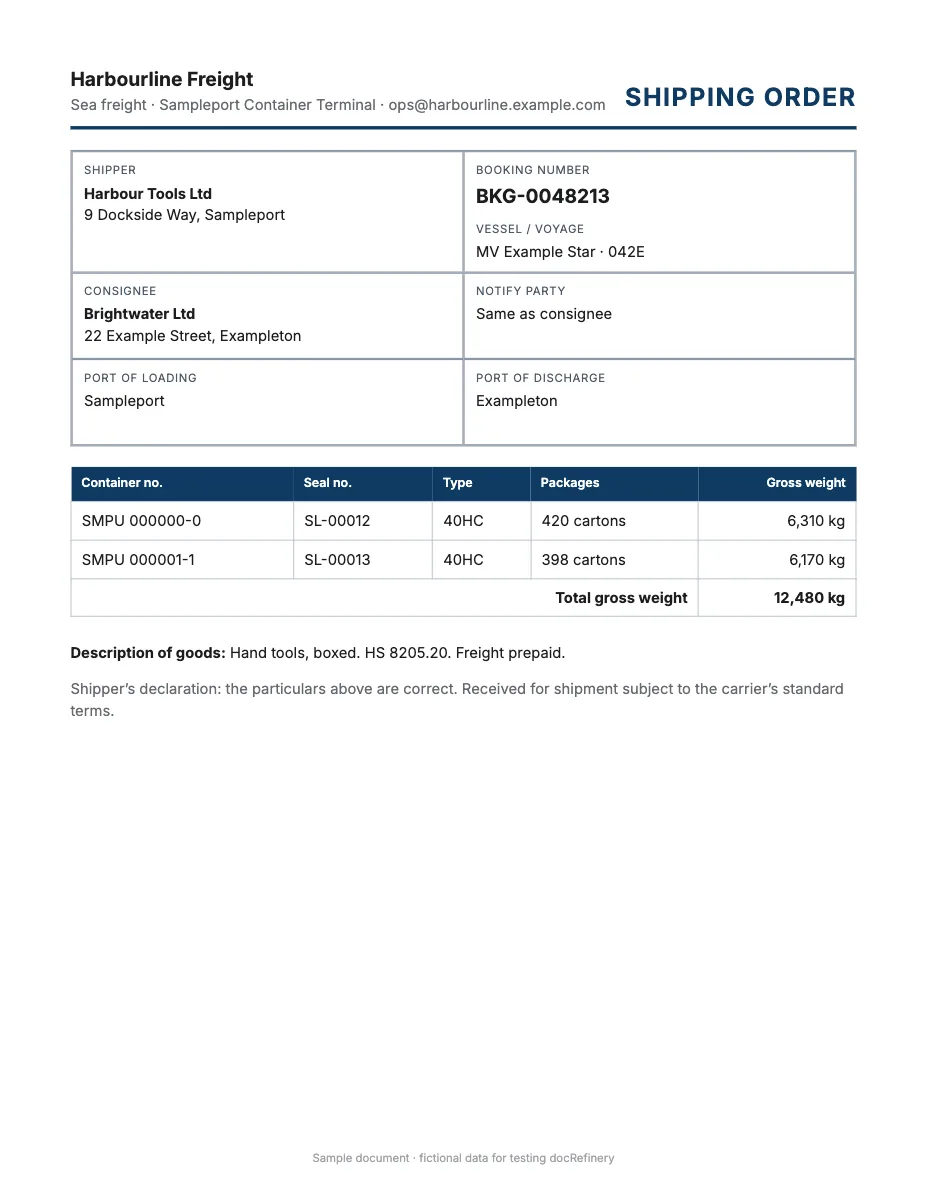
  "booking_number": "BKG-0048213",  "shipper": "Harbour Tools Ltd",  "consignee": "Brightwater Ltd",  "port_of_loading": "Sampleport"}
Any layout, no template
It works out the fields from the page itself, so there's nothing to set up.
Scans and phone photos
Digital PDFs, scanned pages and photos all go through the same way.
Structured, not just text
Named fields and table rows you can download as Excel, CSV or JSON, not a wall of OCR text.
An API when you need it
The same data from your own code, as the sample call further down shows.
What the free shipping document extractor reads
- Parties: shipper, consignee, notify party, forwarder and carrier.
- Routing: vessel, voyage, port of loading, port of discharge and place of delivery.
- Numbers: booking number, order number, B/L number, container and seal numbers.
- Cargo: description, HS code, packages, gross weight and volume.
- Terms: Incoterms, freight terms, dates of shipment and delivery.
Types of shipping document you can upload
| Document | Also called | Fields people want |
|---|---|---|
| Shipping order | Shipping instruction, booking confirmation, SI | Booking number, parties, cargo |
| Bill of lading | B/L, BoL, sea waybill, house and master bill | B/L number, containers, ports |
| Air waybill | AWB, MAWB, HAWB | AWB number, airports, weight |
| Road and rail | CMR, consignment note, lorry receipt (LR), railway receipt | Carrier, consignor, consignee |
| Packing list | Packing slip, weight list | Cartons, weights, dimensions |
| Delivery note | Delivery order (DO), proof of delivery (POD), goods received note | Items, receiver, date |
| Commercial invoice | Export invoice, customs invoice | Value, HS code, Incoterms |
| Customs entry | Bill of entry, shipping bill, goods declaration (GD) | Declaration number, duty, HS code |
Shipping paperwork by region
| Region | Local documents | References printed |
|---|---|---|
| Pakistan | Goods declaration (GD), WeBOC entries, delivery order | GD number, NTN, IGM number |
| India | Shipping bill, bill of entry, lorry receipt, e-way bill | IEC, GSTIN, e-way bill number |
| UAE, Gulf | Delivery order, customs declaration, Dubai Trade entries | BOE number, TRN |
| United Kingdom, EU | CMR, CHIEF or CDS entry, T1 transit, EUR.1 | EORI, MRN |
| United States | Straight BOL, ISF, customs entry 7501 | SCAC, PRO number, EIN |
| China and East Asia | Export declaration, sea waybill | Customs number, HS code |
Container numbers and multi-page bills
Container and seal numbers are easy to mistype and expensive to get wrong, so they're the first fields to check in any result. A long shipment often lists its containers and cargo on rider pages after page 1, which is where a free account comes in: it reads every page and joins the rows.
Shipping orders aren't a built-in document type yet, so an account reads each carrier's format through a workflow built from one sample. Logistics and freight covers the full document set.
Sample API call
This is how the same shipping order looks from your own code. wf_demo_shipping_order is a dummy workflow id and every value below is invented, so the call won't run as written. A real run reads every page and adds a confidence score and page position to each field.
curl -X POST "$DOCREFINERY_API/v1/workflows/wf_demo_shipping_order/run" \
  -H "Authorization: Bearer $DOCREFINERY_API_KEY" \
  -F "[email protected]"

# Take trace_id from the answer, then poll until status is "fulfilled"
curl "$DOCREFINERY_API/v1/runway/9f1c0a7e" \
-H "Authorization: Bearer $DOCREFINERY_API_KEY"{
"trace_id": "9f1c0a7e",
"status": "fulfilled",
"document_type": "shipping_order",
"result": {
"fields": [
{
"key": "booking_number",
"alias": "Booking Number",
"text": "BKG-0048213",
"field_confidence": 0.99,
"location": { "page": 1, "bbox": [0.08, 0.12, 0.46, 0.14] }
},
{
"key": "shipper",
"alias": "Shipper",
"text": "Harbour Tools Ltd",
"field_confidence": 0.98,
"location": { "page": 1, "bbox": [0.08, 0.17, 0.46, 0.19] }
},
{
"key": "consignee",
"alias": "Consignee",
"text": "Brightwater Ltd",
"field_confidence": 0.97,
"location": { "page": 1, "bbox": [0.08, 0.22, 0.46, 0.24] }
},
{
"key": "containers",
"alias": "Containers",
"table": [
[
{ "key": "container", "alias": "Container", "text": "SMPU 000000-0" },
{ "key": "seal", "alias": "Seal", "text": "SL-00012" },
{ "key": "type", "alias": "Type", "text": "40HC" }
]
]
}
],
"extraction_approval": "auto",
"low_confidence_fields": []
}
}Make it run on your own shipping order
- Create a free account.
- Upload one sample under Workflows, keep the fields you want and save. That gives you a real workflow id.
- Create an API key under Settings. Keys are switched on per account, so ask us if you don't see the option.
- Set
DOCREFINERY_APIandDOCREFINERY_API_KEYas in the quickstart, and swap in your id.
Free try or free account?
| Feature | Free try | Free account |
|---|---|---|
| Pages read | Page 1 | Every page |
| Allowance | 5 tries a day | 100 pages a month |
| File size | Up to 10 MB | Up to 100 MB |
| How it reads | Finds the fields on the page | A workflow built from one sample |
| Checking | Compare with your page | Confidence scores and page citations |
| Output | Fields on screen, download as Excel, CSV or JSON | Excel, CSV and JSON for every page, and API keys on request |
Common questions
Can I extract a bill of lading for free?
Yes. Upload the first page and the parties, ports, containers and cargo come back as structured fields. You get 5 free tries a day with no account or card.
Does it work with every shipping line?
It isn't tied to a list of carriers. It reads what's on the page, so a bill from any carrier or forwarder goes through the same way. Check container numbers against the original.
Can it read an air waybill, CMR or packing list?
Yes. Any shipping document works, including air waybills, CMR notes, packing lists and delivery orders. The tool works out the fields from the page itself.
Can I send shipping documents through an API?
Yes. A free account can save a workflow for each format and run it through the API. API keys are switched on per account, and results export as JSON, CSV and XLSX.
Related
- Logistics and freightBill of lading OCR that returns fields, not text: consignee, container and seal numbers, weights, HS codes and ports, checked against your own rules.
- Invoice OCRFree invoice OCR and data extraction. Pull supplier, tax, totals and line items from a PDF or scan as structured JSON, with no account or card needed.
- Purchase orderTurn customer and supplier purchase orders into order lines, terms and delivery dates. A PO OCR API with confidence scores and box citations on values.
- Insurance claim OCRFree insurance claim form OCR. Extract the policy, claimant, dates and amounts from a claim form as structured data, with no account or card needed.
Try it on your own shipping order.
Free, with no sign-up and no card.